

We get it: not every attendee you want in the room at your event will be able to make it. Whether it’s a capacity issue, an attendee can’t travel to be there in-person, or even an unexpected illness derails their plans, odds are, there will be people who would benefit from being at your event who just can’t be.
Not to mention, you may want to increase the reach of your event, or specific aspects of your event, to people who can’t attend the full meeting, or simply don’t need to be present at a full meeting.
Maybe you want to include a CEO townhall that’s relevant for the entire organization during an upcoming sales meeting. Perhaps an association meeting has a keynote speaker that could bring more awareness to the association and drive traffic for upcoming events. Maybe you want to have your entire organization present at an event, but it’s not financially feasible for large international teams to travel to one location.
The solution is live streaming your event, and while it may sound complicated, in the hands of an experienced AV team, it’s simpler than you’d think.
Keep reading to learn everything you need to know about live streaming your event.
A Reliable Internet Connection.
First and foremost, if you’re going to live stream an event, you need a reliable, high-speed internet connection. Without it, live streaming an event is, quite literally, impossible.
A slow internet connection means that the feed for both audio and visual will come through slow and choppy, and possibly out of sync, if they come through at all.
While many event venues offer free wifi, the vast majority of the time, it’s necessary to pay to upgrade to a dedicated internet package that other attendees don’t have access to. If available, use a hardline internet connection for even faster speeds.
Video.
You want remote attendees to see the event, which means you need to capture footage and process the feed instantaneously.
Here’s what you need:
Camera.
A professional grade camera used for the primary visual on the event’s streaming feed is non-negotiable.
If you already have cameras onsite to capture footage for IMAG or show records, you don’t necessarily need to have a different or dedicated camera for the live feed. In fact, teams will often utilize the camera feed that is used for IMAG, as it typically gives a close up view of the presenters.
Capture card & switcher.
A capture card converts the video into a digital format that your computer can read – something that is especially important when an event is being live streamed, as the conversion needs to happen in real time.
If the event does feature several cameras and you’d like to have the ability to switch between cameras for the remote audience’s view, you’ll also need a hardware switcher to perform the live cuts and transitions. This switcher gives additional flexibility as well. It allows you to switch between the camera feed and playback for video cues, as well as show the presenter and any visual presentation materials, like PowerPoint slides at the same time, in either a side-by-side format or with the presenter in picture-in-picture (PIP) and their slides full screen.
Audio.
Arguably more important than the video is the audio, for the sole reason that your remote attendees need to hear what the presenter is saying more than they need to see them saying. And in order for that to happen, you need a high-quality audio source, or several sources if you have multiple presenters or audio formats.
Of course, you need this regardless of whether of not you’re live streaming the event, which means you won’t need additional equipment to make this happen.
Your presenters will already be using microphones, whether it’s a wireless lapel, a handheld mic, or a wired microphone, and that feed can serve both the in-room attendees and anybody watching the live stream.
An audio mixer or encoder is also needed to control what the attendees are hearing at each point during the event. But just like with the microphones, the same audio console and system can be used for both purposes.

Broadcasting Platform.
Your remote audience needs a place where they can watch your event, and there’s no shortage of platforms you can use. The right one for you depends on a variety of factors.
First, and possibly most importantly, can this session be viewed by the general public, or do you need to make sure only approved, invited users are able to watch the session?
Next, how many people do expect to join?
Finally, are you looking to have any interaction from those joining remotely, or between the remote viewers and the presenters?
If you’re looking to reach a wide audience and are open to having anybody from the general public joining the event, services like YouTube Live or Facebook Live are great, and typically free, tools.
However, if it’s important that your event is only accessible to people within your organization or who have permission to see the sessions, using a platform like Zoom or Teams and creating a dedicated, password protected link, will keep the meeting private and any messaging shared safe.
A Dedicated Live Streaming Manager.
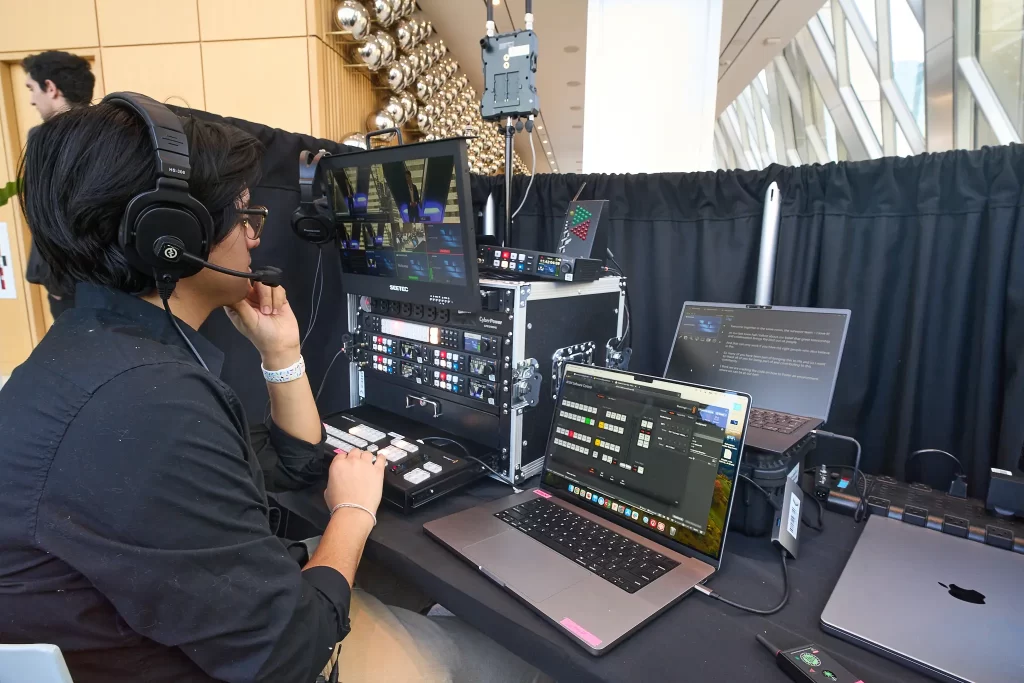
Many of the tools you have onsite at your event will allow you to easily live stream to remote audiences, with just a few adjustments.
However, there is one thing that will help to ensure the attendees who watch the live stream have a smooth experience: a dedicated live streaming manager.
Having one person who is in charge of managing all live stream components during the event gives you more flexibility to switch between camera feeds or adjust audio, allows you to facilitate some interactions with remote attendees, and keeps the rest of the team focused on their top priority: supporting the in-room experience.
If you’re looking to live stream an upcoming event, our team is here to help! Reach out to us today to learn more about what tools and equipment you’ll need to support a great experience.